
Aviation IETM Software
NIVOMAX S1000D IETP / IETM Viewer
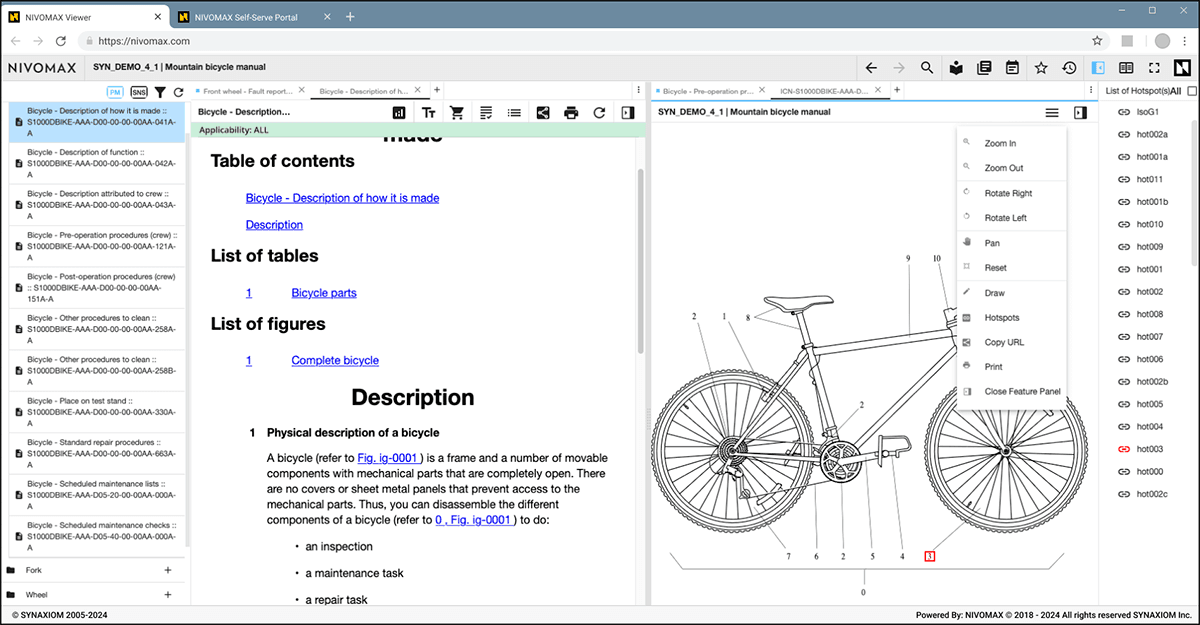
A modern, secure viewer for S1000D, ATA iSpec 2200, and legacy aviation technical publications.
The NIVOMAX S1000D Viewer is a unified S1000D IETP / IETM Viewer designed for operators, OEMs, and MROs that require dependable access to technical publications across mixed fleets and varied operating environments.
One Viewer for All Technical Data
 The Viewer brings all required technical content into a single workspace, simplifying daily tasks and eliminating the need for multiple tools. Supported content includes structured procedures, troubleshooting flows, wiring diagrams, parts information, annotations, applicability filtering, and related links across modules.
Made for Real Operational Environments
NIVOMAX supports multiple Viewer editions to meet any access scenario:
- Web Edition – Fast, plugin-free browser access
- Desktop Edition – Full offline library access for remote or hangar workflows
- Mobile Edition (iPad) – Touch-optimized viewing for inspections and mobile tasks
- Network Edition – Centralized libraries with controlled local network access
All editions share the same entitlement model, interface consistency, and user workflow.
Highlights
Robust Search & Clear Navigation
The Viewer is designed to help users find information quickly and stay oriented:
- Fast search across all manuals in a library
- Hit highlighting with next/skip controls
- Search history
- Back/forward navigation
- Jump links across modules, diagrams, and cross-references
- Workspace persistence so users can pick up exactly where they left off
Interactive Wiring & Graphics
Powerful graphics tools streamline diagnostics and system navigation:
- Interactive wire tracing
- Sheet-to-sheet diagram flow
- Hotspots linking to procedures and components
- Full CGM/SVG rendering
- All CGM interactive features—tooltips, links, hotspots, callouts—fully preserved
- Printable diagram sets for offline or hangar work
Integrated Parts Information
The Viewer includes complete parts support:
- Exploded views with callout highlighting
- Linked assemblies and component references
- Manufacturer details when available
- Filters and part search
- Buildable material lists, printable part orders and direct online ordering
Parts, wiring, and procedures all share consistent tools and navigation.
Applicability Filtering
Users can refine content based on:
- Service Bulletin incorporation status
- Product or aircraft-specific applicability fields
The Viewer shows only the tasks, steps, and data relevant to the selected aircraft, reducing noise and improving clarity.
Reliable Offline Access
NIVOMAX is built for environments where connectivity varies:
- Local storage of libraries
- Automatic sync when reconnected
- No VPN requirement
- Out-of-band entitlement validation for low-connectivity conditions
This ensures continuous access whether online, offline, or transitioning between the two.
Secure, Flexible Access Control
The platform offers modern, adaptable access workflows:
- Out-of-band and OTP authentication
- MFA-compatible flows
- Encrypted local data
- Device-based or user-based entitlements
- Role-based permissions
- Support for RDP, Intune, silent installation, and server-mode data services
Built to fit enterprise deployment models without compromising mobility or usability.
Optimized for Large or Distributed Fleets
NIVOMAX supports efficient use of data licenses and device access, including:
- Device-linked entitlement options
- Library assignment by fleet or user group
- Offline-ready datasets tied to assigned devices
- Centralized license visibility and management
This helps organizations equip every device consistently while maintaining control.
Extended Capabilities With Add-On Modules
The Viewer can be enhanced with optional extension modules that expand operational workflows:
- FleetPass – Device-based entitlement and simplified library assignment across fleets.
- LiveConnect – Integrated feedback, communication, and issue tracking directly within the Viewer.
These modules extend Viewer capabilities, improve data quality processes, and support scalable deployments.
Part of the Complete NIVOMAX Platform
The Viewer integrates with the broader NIVOMAX ecosystem, including the Self-Serve Portal, data distribution, licensing management, and optional extensions to deliver a complete environment for creating, managing, and accessing technical publications.
Experience the NIVOMAX Viewer
Deliver fast, secure, and flexible access to S1000D and ATA technical publications—anywhere, online or offline.
Frequently Asked Questions
About Our IETP / IETM Viewer for the NIVOMAX Aviation Technical Publications Platform
What formats or standards does the NIVOMAX Viewer support?
NIVOMAX supports S1000D XML, ATA iSpec 2200 SGML, legacy manuals (PDF), wiring diagrams (CGM/SVG), troubleshooting modules, and illustrated parts data.
Does the Viewer work offline?
Yes. Users can store libraries locally, work without internet connectivity, and automatically sync when back online with no VPN required.
Which devices and platforms are supported?
The Viewer is available as Web, Desktop, iPad, and Network Editions, supporting browsers, Windows devices, iPadOS, and Windows Server environments including RDP, Intune deployment, and server-mode data operations.
Does the Viewer support wiring diagrams and intelligent graphics?
Yes. NIVOMAX includes interactive wire tracing, sheet-to-sheet navigation, hotspots, callout highlighting, and full CGM/SVG rendering. All CGM interactive features such as tooltips, links, hotspots, and cross-references are fully preserved.
How does NIVOMAX ensure the security of data and user access?
NIVOMAX follows secure software development practices and uses encrypted local storage and encrypted data transport to protect technical publications and user information. Authentication and authorization are fully configurable, supporting user-based and device-based entitlement models. Administrators can tailor roles, permissions, and access flows to match organizational requirements.
How does authentication work?
NIVOMAX supports modern authentication options including out-of-band authentication, OTP access, and MFA-ready flows. It integrates with identity systems through SAML 2.0, OAuth 2.0, OpenID Connect (OIDC), and SCIM — enabling Single Sign-On (SSO) and automated provisioning with providers such as Azure AD, AWS IAM Identity Center, Okta, and PingFederate.
Can the Viewer support large or rotating fleets?
Yes. Device-based entitlement and centralized library assignment are enabled with the optional FleetPass extension. Library access can be assigned by fleet, device type, or user group.
How do users submit feedback or report issues?
With the LiveConnect extension, users can submit feedback directly from the Viewer, attaching screenshots or notes, and track responses through the portal.
Does the Viewer integrate with enterprise IT and other systems?
Yes. NIVOMAX supports enterprise deployment tools and offers APIs for upstream integration with PLM systems, ERP platforms, maintenance and engineering systems, and identity providers — helping automate content distribution, entitlement workflows, and provisioning.
Is the Viewer part of the larger NIVOMAX platform?
Yes. The Viewer works alongside the Self-Serve Portal, licensing tools, distribution services, and extensions such as FleetPass and LiveConnect. The platform can be configured and extended to meet specific OEM, operator, or MRO requirements.