
NIVOMAX Self-Serve Portal
Data License and Access Management for Aviation Technical Publications
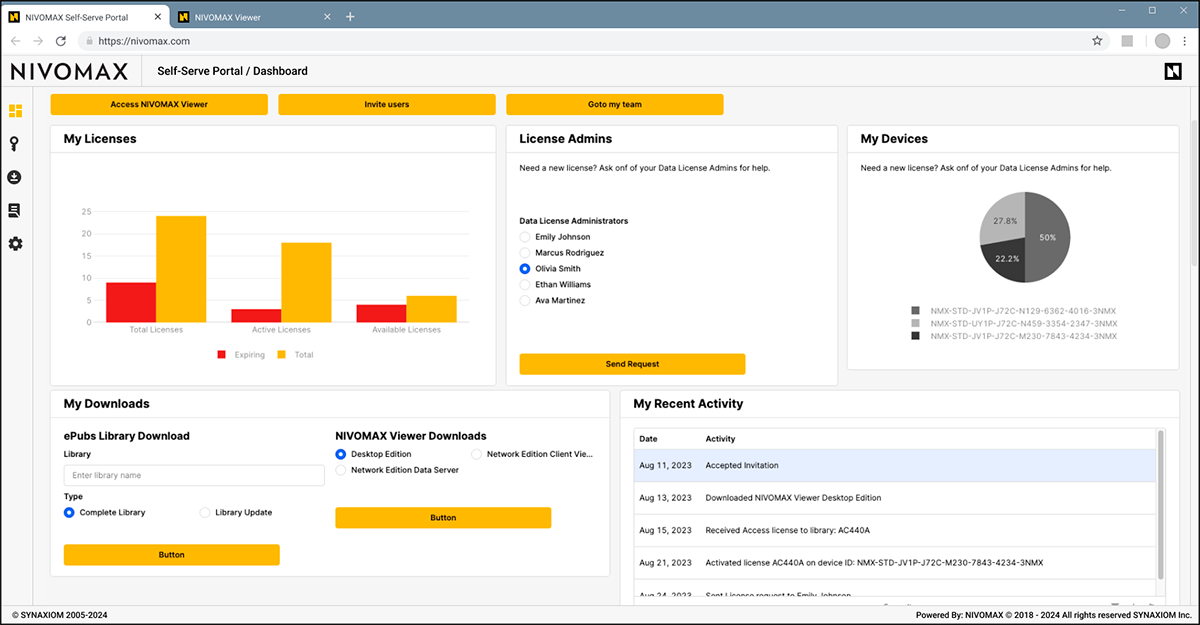
The NIVOMAX Self-Serve Portal provides a centralized environment where administrators, fleet managers, librarians, and operational teams can manage users, teams, data licenses, entitlements, and NIVOMAX Viewer downloads. It is designed for aviation operators, OEM customer support teams, and MRO organizations that require efficient and controlled access to their technical publication libraries.
Unified Self-Serve Portal for Operational Teams
The Self-Serve Portal simplifies how organizations manage access to NIVOMAX applications and technical publications. Teams can be configured quickly, users can be invited and assigned roles, and publication libraries or Viewer software can be downloaded without external support.
The Self-Serve Portal supports the teams responsible for accessing technical data, coordinating users, and managing licenses across their operational environment.
Used by:
- OEM customer administrators
- Aircraft operators
- Maintenance Technicians
- MRO and engineering organizations
- Librarians and digital publication managers
- Fleet managers
- General registered users and team administrators
Key Benefits
Self-Serve User and Team Management
Create and manage teams, assign roles, and configure access with minimal friction. The portal supports internal and cross-organizational structures common in aviation environments.
Clear License and Entitlement Visibility
Users and administrators can see active, expiring, and available licenses. License requests can be sent directly to designated administrators when needed.
Centralized Downloads
Access Viewer Apps and publication libraries from a single location. This ensures consistent deployment of tools and data across maintenance, engineering, and operational teams.
Role-Based Access Control
Define access privileges based on team membership, operational responsibilities, fleet programs, or contractual requirements.
Supports Enterprise Single Sign-On
SSO enables seamless authentication for organizations that rely on centralized identity management.
Aligned With Customer Deployment Models
The Self-Serve Portal works within the same deployment model as the broader platform. Whether the platform is hosted in a customer-owned cloud, hybrid environment, or fully on-premise installation, the SSP remains consistent and secure.
Core Capabilities
Team and Access Administration
Manage internal or external teams, assign user roles, and adjust access rights to match organizational structures and operational responsibilities.
License and Subscription Oversight
Review available entitlements, confirm access, and identify when additional licenses are required. Administrators can maintain full visibility into subscription status.
My Devices and Activity Tracking
Users can view their registered devices, review recent actions, and maintain awareness of how and where they access technical documentation.
Viewer and Publication Downloads
Access all Viewer software editions and entitled technical publication libraries directly within the portal.
Integration Capabilities
The Self-Serve Portal can integrate with customer-owned entitlement or subscription management systems. Through APIs, organizations can synchronize entitlement data directly into NIVOMAX to maintain consistent license visibility across internal systems and the platform.
Part of the NIVOMAX Platform Ecosystem
The Self-Serve Portal is one of the core applications within the NIVOMAX Platform and works in conjunction with:
- NIVOMAX Viewer for secure access to technical publications
- NIVOMAX Builder for publishing and validating structured aviation data
- Sales Center for entitlement distribution
- Extensions and integration modules for advanced workflows and connections
Together, these applications support the full lifecycle of aviation technical publications from creation and validation to licensing, distribution, and end-user access.
Request a Demo
Explore how the Self-Serve Portal supports your operational workflows.
A full platform demonstration includes SSP and all core NIVOMAX applications.
Frequently Asked Questions
About the NIVOMAX Self-Serve Portal
Who typically uses the Self-Serve Portal?
The portal is used by operational teams such as fleet managers, librarians, engineering staff, maintenance personnel, and customer support administrators who need to manage access to technical publications and Viewer applications.
Does the Self-Serve Portal replace the Viewer or Builder?
No. The portal complements the other NIVOMAX applications by handling user management, entitlements, and downloads. It does not display technical publications or publish new content.
Can users download Viewer software directly from the portal?
Yes. The Self-Serve Portal provides a central download area where authorized users can access the Desktop Edition and Network Edition (LAN-deployed) versions of the NIVOMAX Viewer.
How are licenses and entitlements managed in the portal?
Users can see their available and active licenses. Administrators can assign entitlements, review access levels, and approve incoming license requests.
Does the portal support enterprise authentication?
Yes. NIVOMAX supports single sign-on for organizations that use centralized identity systems.
Can the Self-Serve Portal integrate with our internal systems?
Yes. SSP can integrate with a customer’s in-house subscription or entitlement management system through APIs to synchronize access rights and entitlement information.
Is deployment tied to cloud hosting?
No. SSP follows the same deployment model as the NIVOMAX Platform and can operate in customer-owned cloud environments, hybrid installations, or fully on-premise setups.